Microsoft Copilot Studio
By Coda One Team · Last verified: March 2026
Disclosure: Some links earn us a commission at no extra cost to you. Rankings are independent — tools cannot pay for placement.
Build and customize AI agents across the Microsoft 365 ecosystem
What is Microsoft Copilot Studio?
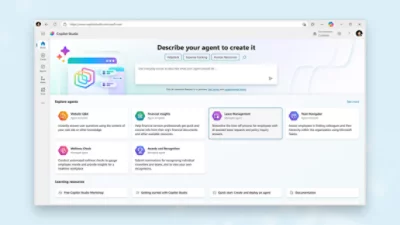
Microsoft Copilot Studio is an enterprise-grade low-code platform for building, customizing, and managing AI agents that integrate deeply with the Microsoft ecosystem. It replaced Power Virtual Agents and expanded its scope significantly, enabling organizations to create autonomous AI agents that work across Microsoft 365, Dynamics 365, and third-party systems.
The platform allows users to build agents using a visual designer with natural language descriptions, topic-based conversation flows, and generative AI capabilities powered by Azure OpenAI. Agents can access enterprise knowledge through SharePoint, Dataverse, public websites, and custom data sources via Microsoft Graph connectors. Built-in generative answers let agents respond to questions outside pre-built topics using grounded enterprise data.
Copilot Studio agents can be deployed across Microsoft Teams, web, mobile, Facebook, and custom channels. They support multi-language, multi-turn conversations with context retention, entity extraction, and adaptive cards for rich interactions.
For IT and business process automation, agents can trigger Power Automate flows, call custom APIs, and hand off to human agents in Dynamics 365 Customer Service. The platform includes built-in analytics, conversation transcripts, and AI-driven performance insights. Enterprise security features include DLP policies, environment management, role-based access, and compliance with Microsoft's trust infrastructure.
Key Features
Pros & Cons
Pros
- ✓ Unmatched integration with Microsoft ecosystem (M365, Dynamics, Azure)
- ✓ Enterprise-grade security, compliance, and governance built in
- ✓ Low-code interface accessible to business users, not just developers
- ✓ Generative AI capabilities backed by Azure OpenAI infrastructure
Cons
- ✗ Expensive at $200/user/mo, especially for large teams
- ✗ Heavily tied to Microsoft stack — limited value outside that ecosystem
- ✗ Complexity increases significantly for non-trivial agent behaviors
Ready to try Microsoft Copilot Studio?
See if it fits your workflow — plans start at $200/month per user for standalone; included in select Microsoft 365 plans with message limits.
Pricing
$200/month per user for standalone; included in select Microsoft 365 plans with message limits
Copilot Studio
$200/user/mo
- ✓Unlimited agents
- ✓Generative AI answers
- ✓Custom topics and flows
- ✓Multi-channel deployment
- ✓Power Automate integration
Message Pack Add-on
$100/pack
- ✓25,000 additional messages
- ✓For high-volume scenarios
M365 Copilot Included
Included
- ✓Limited agent capabilities within M365 Copilot license
- ✓Basic customization
Pay with crypto using a virtual Visa card
Humanize AI content from Microsoft Copilot Studio
Transform AI-generated text into natural, human-sounding writing that bypasses detection tools.
Try FreeWho is Microsoft Copilot Studio for?
Internal IT helpdesk agents handling common employee requests
Customer service automation integrated with Dynamics 365
HR onboarding assistants pulling from SharePoint knowledge bases
Sales support agents with CRM data access and meeting scheduling
Compliance and policy Q&A bots for regulated industries
Frequently Asked Questions
How much does Microsoft Copilot Studio cost?
$200/month per user for standalone; included in select Microsoft 365 plans with message limits Plans start at $100/mo.
What are Microsoft Copilot Studio's key features?
Microsoft Copilot Studio's standout features include Visual agent builder with natural language topic creation, Generative AI answers grounded in enterprise knowledge, Deep Microsoft 365 and Dynamics 365 integration, Multi-channel deployment (Teams, web, mobile, social). It offers 8 features in total designed for internal it helpdesk agents handling common employee requests.
Can I pay for Microsoft Copilot Studio with cryptocurrency?
Microsoft Copilot Studio does not currently accept cryptocurrency directly. However, you can pay with crypto using a virtual Visa card funded by USDT, USDC, or other stablecoins.
What are the best alternatives to Microsoft Copilot Studio?
Popular alternatives to Microsoft Copilot Studio include Coze, Dify, LangChain. Each offers different strengths in pricing, features, and specialization.
Does Microsoft Copilot Studio have an API?
Yes, Microsoft Copilot Studio offers an API. The API uses a usage-based pricing model.
Do I need to sign up to use Microsoft Copilot Studio?
Microsoft Copilot Studio requires an account to access most features. If you prefer no-signup tools, browse Coda One's free tools.
Does Microsoft Copilot Studio work on mobile?
Microsoft Copilot Studio works in any modern browser on desktop, tablet, and mobile — no install required. For offline or on-device workflows, check our tool catalog for alternatives.
Is my data safe with Microsoft Copilot Studio?
Review Microsoft Copilot Studio's privacy policy at https://www.microsoft.com/en-us/microsoft-copilot/microsoft-copilot-studio for specifics on data retention. For browser-local processing (no server upload), see Coda One's PDF and image tools.
What pricing plans does Microsoft Copilot Studio offer?
Microsoft Copilot Studio offers 3 plans: Copilot Studio, Message Pack Add-on, M365 Copilot Included. Starts at $100/mo. Compare with Coda One's own pricing.
Can I cancel or get a refund from Microsoft Copilot Studio?
Cancellation and refund policies are set by Microsoft Copilot Studio — check their terms at https://www.microsoft.com/en-us/microsoft-copilot/microsoft-copilot-studio. Coda One's own paid plans can be cancelled anytime from your subscription dashboard.
How can I pay for Microsoft Copilot Studio with USDT or USDC?
Since Microsoft Copilot Studio does not take crypto directly, the practical route is a Coda One virtual Visa card funded by USDT/USDC, which works anywhere Visa is accepted.
Who is Microsoft Copilot Studio best for?
Microsoft Copilot Studio is most useful for Internal IT helpdesk agents handling common employee requests, Customer service automation integrated with Dynamics 365, HR onboarding assistants pulling from SharePoint knowledge bases. For related workflows, explore Coda One's AI tool catalog.
Related Tools

Coze
ByteDance's no-code AI bot platform with plugins and workflow builder
- No-code bot builder with persona, knowledge, and plugin configuration
- 600+ built-in plugins for web search, image gen, code execution
- Visual workflow editor for multi-step automation pipelines
Dify
Open-source platform for building LLM apps with visual agent workflows
- Visual workflow editor for AI agent and pipeline design
- RAG knowledge base with multi-format document ingestion
- Support for 100+ LLM providers including local models via Ollama

LangChain
The leading framework for building LLM-powered applications and agents
- Composable chains and agents with LCEL declarative syntax
- LangGraph for stateful multi-agent orchestration
- RAG pipelines with 100+ document loaders and vector store integrations

Make
Visual automation platform with powerful branching logic for complex workflows
- Visual canvas-based scenario builder with 1,800+ app integrations
- Routers, iterators, and aggregators for complex branching logic
- HTTP/SOAP modules for connecting any REST or SOAP API
Discover More AI Tools
Weekly curated tools, scenarios, and MCP server updates.
Disclosure: Some links on this page may be affiliate links. We may earn a commission if you make a purchase through these links, at no additional cost to you. This helps support Coda One.